

Warmer weather is around the corner, and so is Salesforce’s Spring '26 Release update. Let us put a spring in your step as you explore some of the highlights of the upcoming release!
The Spring '26 release dates are scheduled for the weekends of January 16, February 13, and February 20. So, dust off your calendar and let’s see what’s sprouting in the Salesforce Spring ’26 release!
Customization: Setup with Agentforce (Beta)
The setup agent has gotten a major power-up this spring with an expanded repertoire of abilities, including:
Managing users and user access.
Managing security, including permission sets and groups.
Managing custom fields and objects.
Creating flows.
Pulling relevant information from Salesforce help.
Navigating to the appropriate page in Setup to finish a task.
Creating records and home pages.
Troubleshooting and recommending how to fix formulas.
Reporting on usage and licenses.
Using natural language to administer Salesforce is particularly useful for organizations that lack a dedicated Salesforce administrator. Given the expansive nature of Salesforce's Setup area, we are excited to see what this agent will be capable of in the future!
Development: Get Complete Type Definitions for Lightning Base Components
Salesforce has been incrementally rolling out the ability to use TypeScript to create Lightning Web Components. With this release, all Lightning base components have type definitions, meaning that you can use any Lightning base component in an LWC component created in TypeScript.
TypeScript is a superset of JavaScript, which can improve developer productivity and quality, especially when working in teams, by allowing Developers to check for type errors while building code, thereby catching errors before the code is ever run.
Flow: Compare Screen Flow Versions to Track Changes More Efficiently
Folks who have had the pleasure of troubleshooting what changed between an active flow version and the prior version know how difficult a task that can be, especially when the flow is large and complex. Thankfully, Salesforce has made this process much simpler for screen flows, offering the ability to compare two flow versions using a "Compare Versions" action from the flow's record in the Automation app.
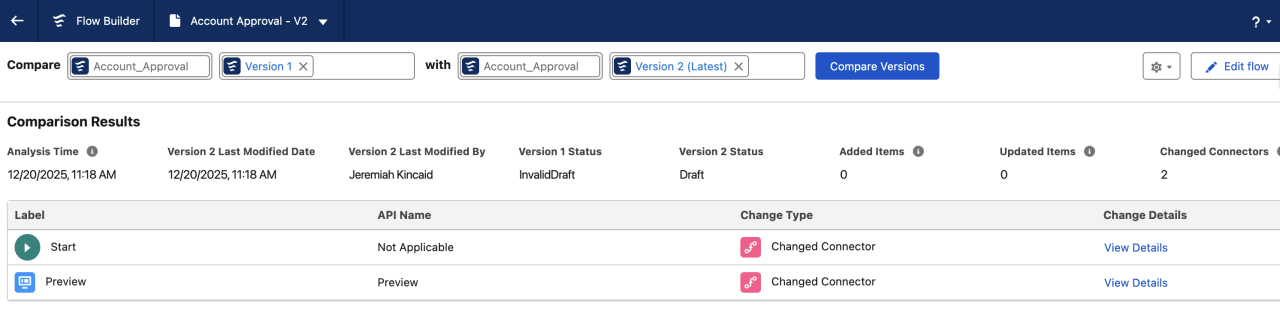
We hope this comparison functionality is extended to all types of flows, as we expect to use this feature often!
Security: Set Up Passwordless Login with Passkeys (Beta)
Passkeys have become widespread as an alternative to passwords over the past couple of years, for good reason, as passkeys can't be phished as easily. Salesforce is embracing this change by giving internal users the ability to log in to their Salesforce org with a passkey, such as Touch ID/Face ID or a security key like a YubiKey.
Another benefit of passkeys is that they satisfy multi-factor authentication requirements, so users with a passkey do not need a second form of authentication. We hope to see this extended to experienced cloud users in the future!
Experience: Make Site Pages More Discoverable by AI
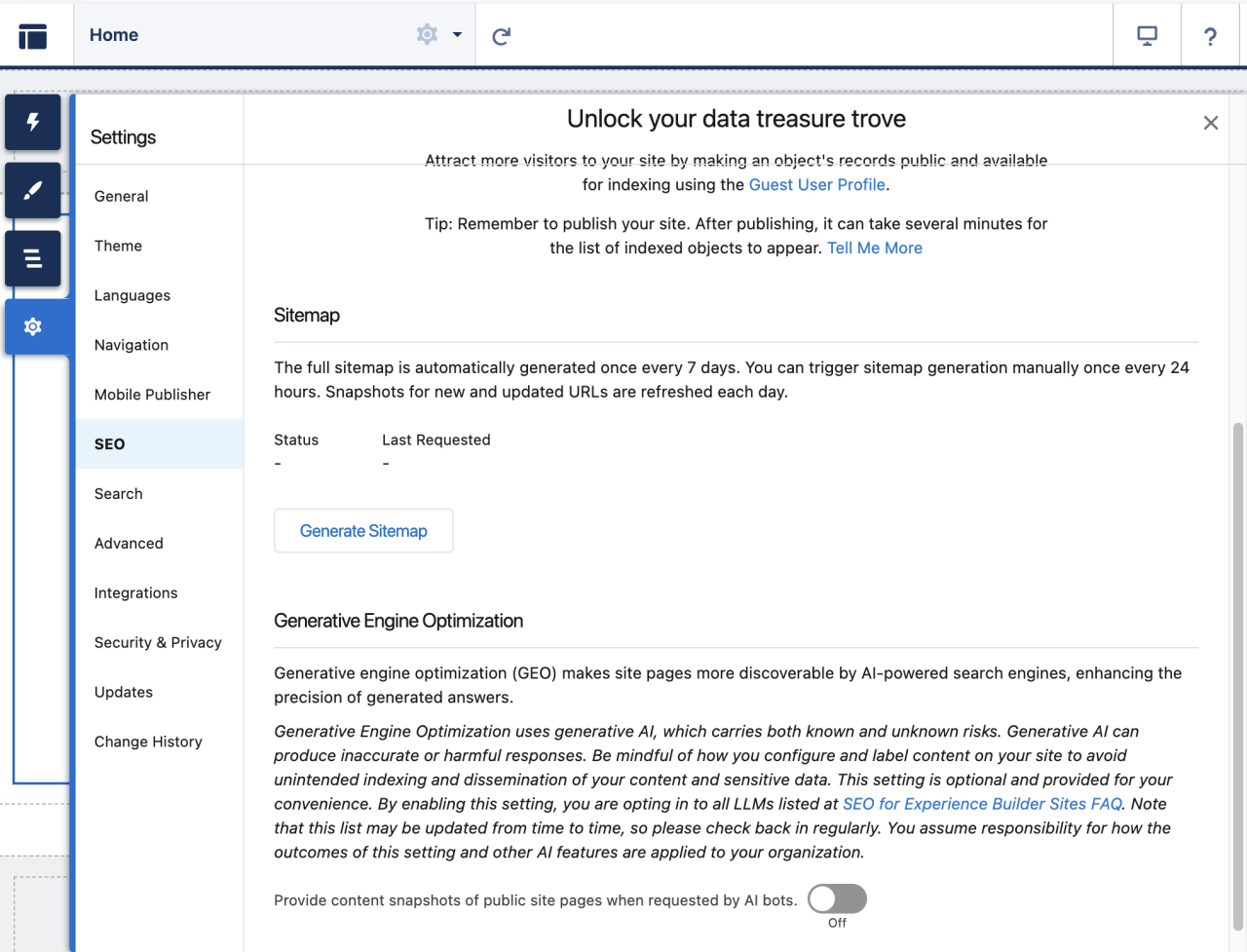
AI-powered search engines such as Google's Gemini are quickly becoming the primary source of information for most users searching the internet. To increase the chance of your public experience cloud site pages making it into AI results, you can now enable generative engine optimization (GEO) in Experience Builder.
To enable GEO, in Experience Builder, go to Settings→SEO, then enable "Provide content snapshots of public site pages when requested by AI bots".
Analytics: Embed Custom Lightning Web Components in Dashboards for Interactive Data Views (Beta)
While this may not seem exciting at first glance, being able to add an LWC component to a dashboard unlocks a wide range of use cases that standard dashboards and reports cannot solve. We expect that highly configurable LWC components will be available for installation from the AppExchange in the future, enabling organizations to add interactive charts to dashboards that are not currently possible today.
Sales: Automate Qualification with Agentforce
For the past year, Agentforce has been able to nurture leads and then hand them off to a human for qualification. Now, with Spring 26, Agentforce can be used to automatically qualify a lead based on the data in the lead and how well that lead aligns with your Ideal Customer Profile (ICP).
Qualification can be enabled by going to your Lead Ge or Lead Nurture agent (formerly known as SDR)'s config and turning on Qualification. Once enabled, enter your company's ICP so the agent knows what to compare leads against.
Service: Gain Instant Case Context with Case Timeline
Service representatives have a wealth of information at their fingertips, but it can take some time to sift through when on the phone or chatting with a customer. To streamline this process, admins can add a timeline to the case that unifies information into a single threaded view, including emails, chats, and messages.
To enable timeline, go to Setup → Timeline and turn on Timeline Configuration.
Field Service: Enhance Mobile App with Native GIS Mapping
Gone are the days when field techs need to switch apps to view GPS information. Now that information is available directly in the Field Service Mobile app, including complex map data such as assets, lines, and polygons. Techs can view and interact with this data when on a record in the mobile app, providing a better user experience and streamlining their work.
To begin, go to Setup→Field Map Settings.
Marketing: Partition and Align Data and Marketing Content with Business Units
Business units enable marketing to segment content according to their organization's structure. This is especially useful if the organization has multiple brands, divisions, etc. Business units would allow organizations to align messages with their target audience, maintain compliance, and streamline marketing performance reporting.
Organizations can have up to 50 business units. To get started, enable business units under Setup.
Commerce: Let Buyers Request a Quote from Their Cart
B2B buyers can now submit a request for a quote directly from their cart, shortening deal cycles by reducing handoffs. The request can be reviewed internally and then sent back to the buyer for acceptance or negotiation. The process repeats until the deal is accepted.
To add the ability to request a quote in a cart, add the Request Quote component to the Cart page in your B2B Commerce Experience Cloud site.
Revenue: Promotions in Agentforce Revenue Management
Manual and automatic promotions can now be created in Revenue Cloud to give discounts on products and categories. Promotion eligibility can be defined based on rules and sales channels. Promotions can be displayed to buyers and sales representatives when browsing products and catalogs, added automatically when products are added, and viewed in the price waterfall.
To begin, users must have the "Apply Promotions on Sales Transactions" permission set assigned.
Nonprofit: Improve the Donor Experience with a Self-Service Donor Support Agent (Beta)
Nonprofits with a donor portal can give their donors the ability to self-service their recurring donations using natural language via a Donor Support agent. The Donor Support agent helps donors with tasks such as changing their recurring donation amount or frequency.
To enable the Donor Support agent, go to Agentforce Studio, turn on Agentforce agents, then turn on Donor Support Agent (Beta).
Education: Configure Educational Characteristics to Enforce Eligibility Checks during Course Registration
Many educational organizations have prerequisites for their courses. Being able to set these prerequisites in a data-driven manner and conveying this information clearly to students can significantly streamline the registration process. With Spring '26, organizations can configure complex eligibility logic on learning courses in Education Cloud and have that logic automatically evaluated on each student to determine eligibility. This information is then displayed to the student in Experience Cloud, allowing them to make informed decisions.
Spring Forward with Salesforce ’26
From Agentforce upgrades to flow and productivity enhancements, Salesforce Spring ’26 delivers powerful updates for every team. Now’s the perfect time to explore what’s new and see how these features can help your organization grow this season!
If you would like more information on this release, please visit the official Salesforce Spring '26 release notes. If you have any questions about Salesforce or would like to see any of the implementations in your own Salesforce organization, please contact DB Services. We would be happy to help!
Need help with your Salesforce digital transformation? Contact us to discuss Salesforce consulting, implementation, development, and support!