AI is transforming the way we work, making repetitive tasks faster and smarter. According to the Stanford Human-Centered Artificial Intelligence 2025 AI Index Report, 78% of organizations reported using AI in their workflows in 2024, and a growing body of research shows measurable productivity gains.
In the world of software, including Claris FileMaker, AI can now assist developers and users by automating content creation, summarizing information, and even drafting emails. By leveraging AI-powered script steps like Generate Response from Model, FileMaker developers can turn existing data into polished, context-aware emails in seconds.
In this article, we’ll explore practical ways AI can support your communication workflows, whether it’s responding to support tickets, following up with clients, or summarizing activity history, while keeping human oversight at the forefront to ensure accuracy and professionalism!
Getting Started
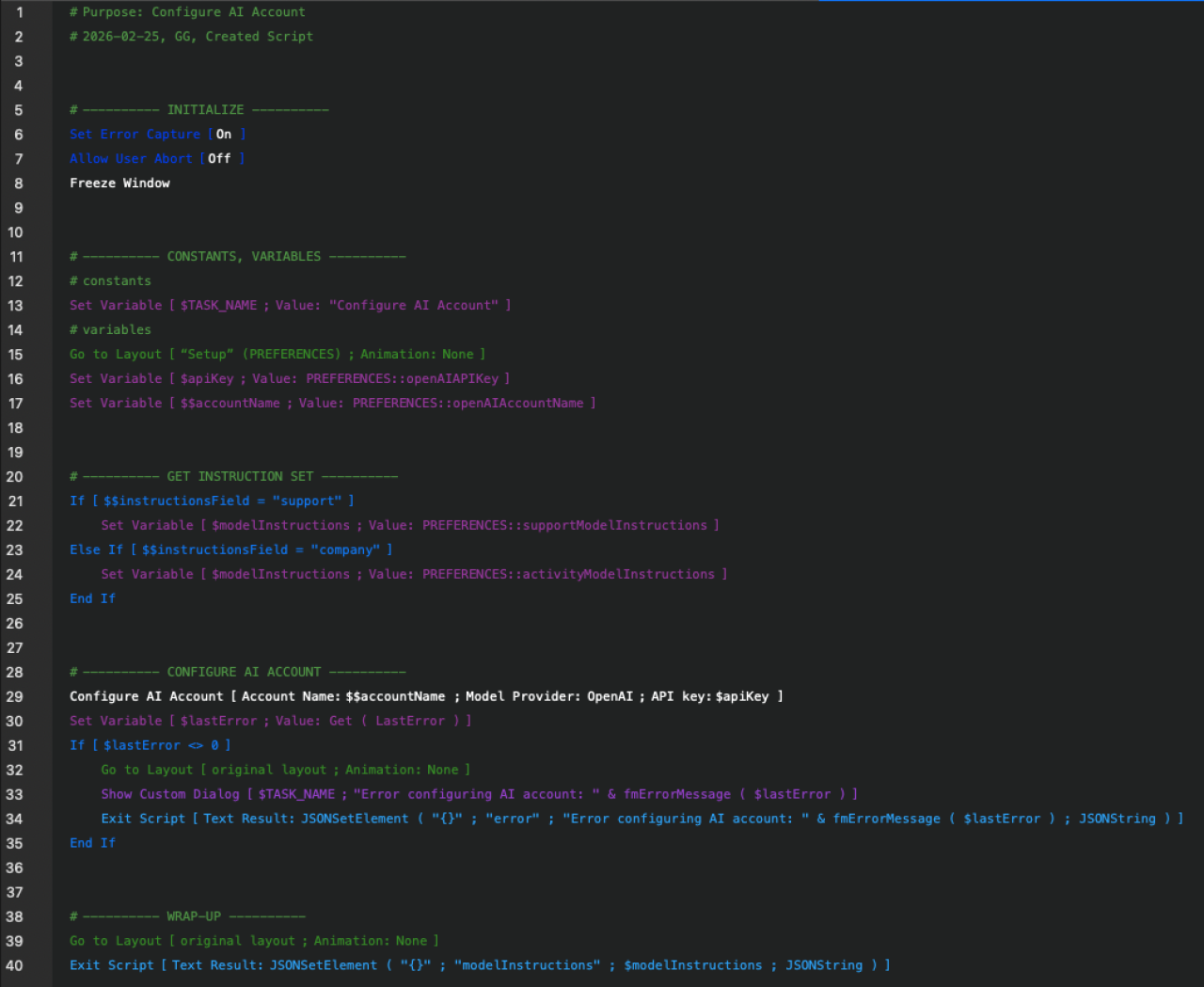
Configure Your AI Account
Before you begin generating emails, you need to configure your account for the AI model you will be using. FileMaker has a script step called Configure AI Account that you will need to use to interact with the AI model. You will need 3 pieces of information for this script step:
The AI model provider you'll be using
The account name for the provider
Your access token from the provider
Configure Model Instructions
Setting up the instructions for your model is how you customize the email template. You can use these instructions to guide the model on how you want your email body structured. See the example below for instructions on support ticket and activity follow-up emails.
Configure Generate Response from Model Script Step
There are tons of customization options for this step, so definitely check out our article, "AI in Claris FileMaker: Generate Response from Model."
For email generation purposes, you'll want to set up the following options:
Account Name
Model
User Prompt (You can use a field for free-form prompting, or a variable set with a predetermined prompt.)
Agentic Mode (This option needs to be checked to allow the model to gather data from your FileMaker solution.)
Response (This can be either a field that the model will populate or a variable.)
Instructions
Tool Call from Model (This can be either a field that the model will populate or a variable.)
Tool Definitions (These are tools that the model can use when running in agentic mode to get data from your FileMaker solution.)
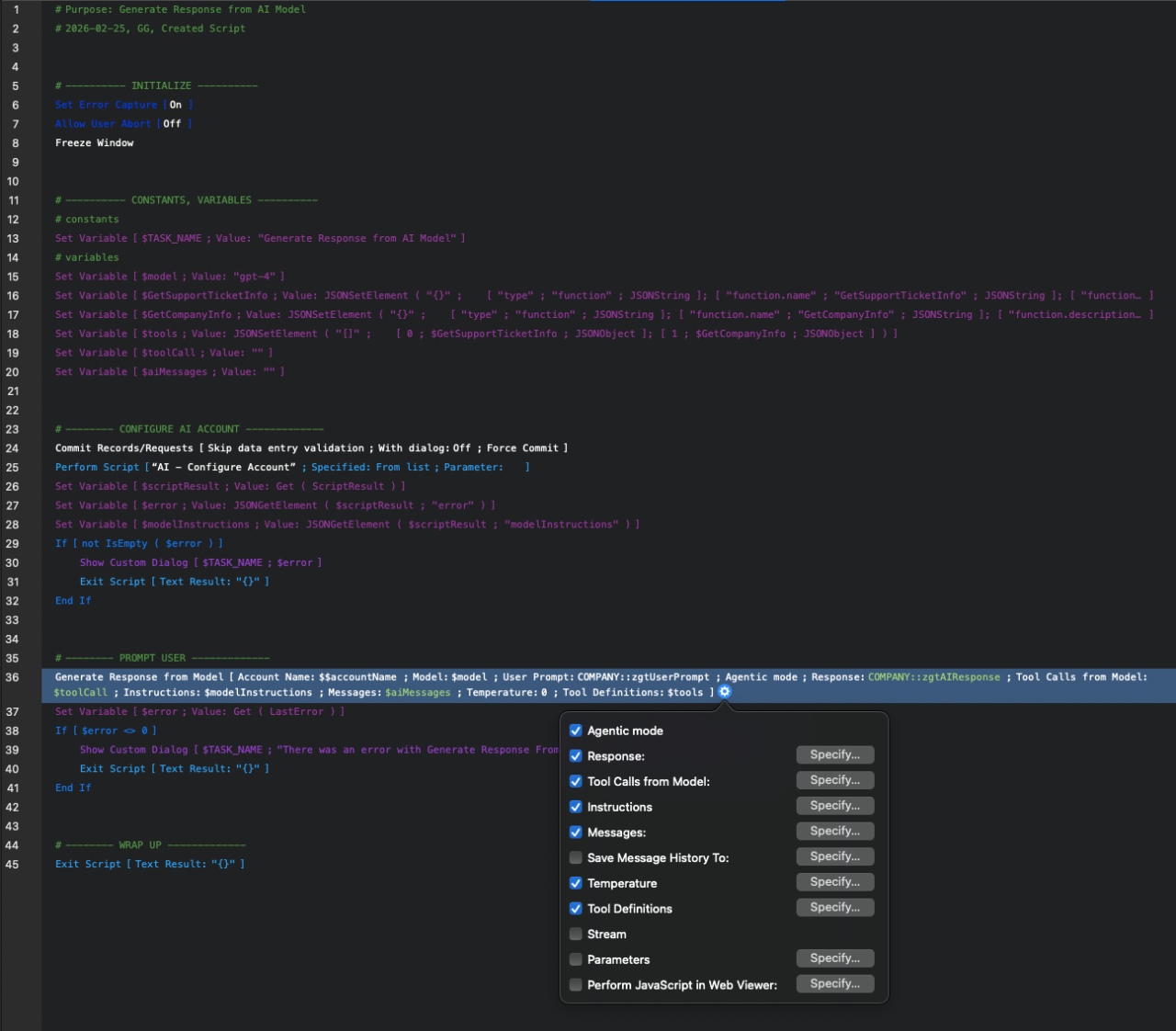
Once you have your options set and your scripts set up, you're ready to start generating emails.
Pairing AI with Existing Email Workflows
While generating AI-driven email content is a powerful first step, many organizations already have automated email notifications configured within their FileMaker solutions. Pairing these systems allows you to not only generate dynamic, context-aware email content but also deliver it automatically based on triggers such as status changes, new records, or scheduled follow-ups.
If you’re looking to integrate AI-generated content with your existing email delivery setup, check out our articles on FileMaker OAuth Emails and Sending Outlook OAuth Emails from FileMaker. These resources walk through how to configure secure, automated email delivery, which can be enhanced by incorporating AI-generated messaging.
Generating Email Use Cases
There are several use cases where using AI to generate emails can be beneficial. In this article, we'll focus on follow-up email scenarios where this would be useful.
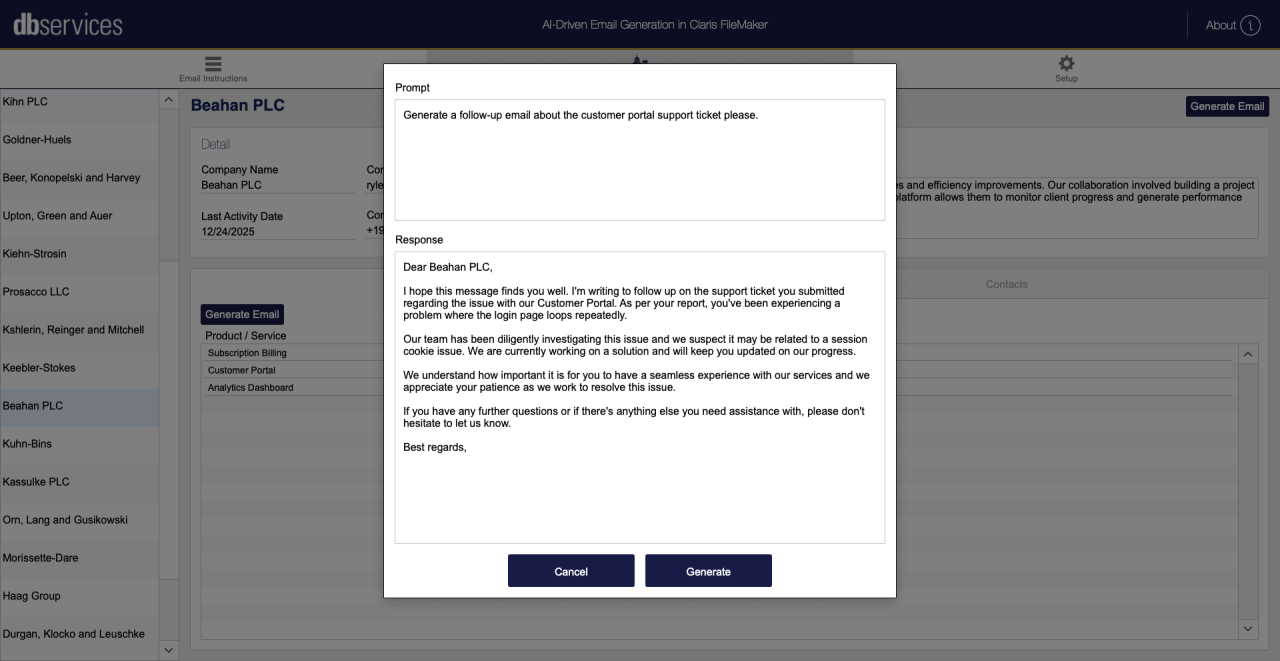
Support Ticket Follow-Up
Generating customer support email responses is a practical use case for AI in FileMaker, as many support workflows already store structured information such as the product involved, the issue description, and internal troubleshooting notes. Instead of requiring support staff to manually draft responses for every ticket, AI can use this stored information to generate a clear, professional email that acknowledges the issue and outlines the next steps. This allows support representatives to review and edit a draft rather than writing from scratch, thereby significantly reducing response times while maintaining a consistent tone across the organization. Because the data already exists within the support ticket record, FileMaker can easily pass that context to an AI model to generate a relevant and helpful response.
Activity Follow-Up
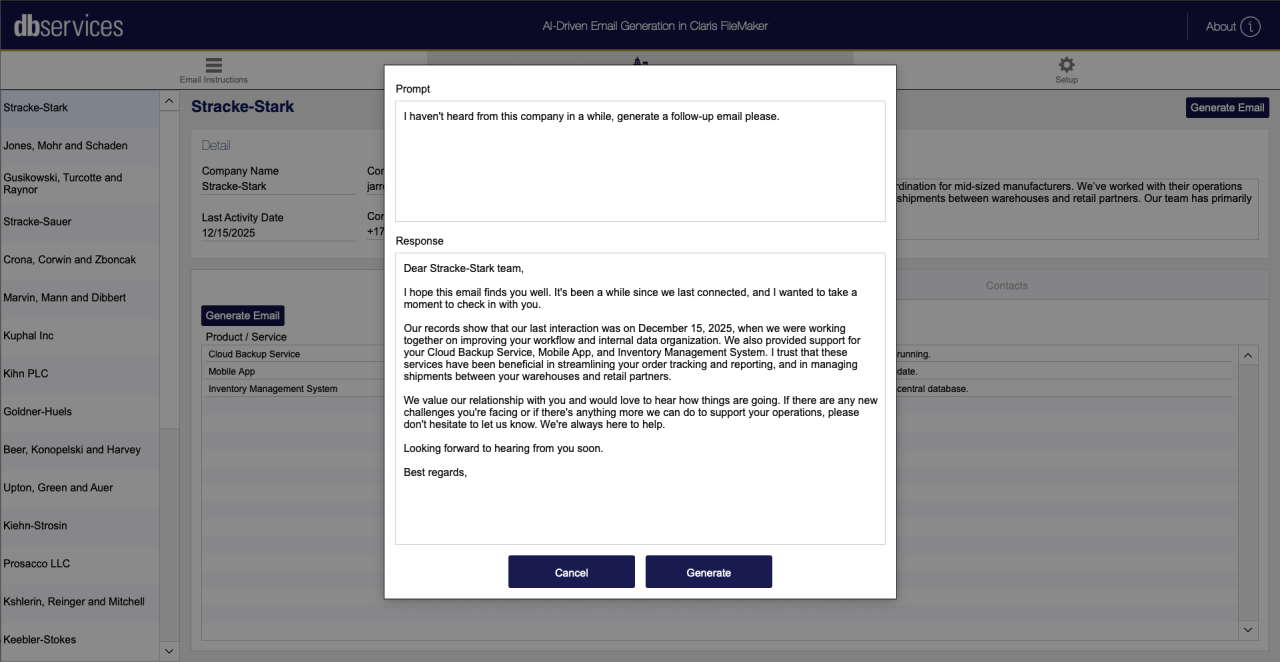
Another valuable use case is generating activity follow-up emails for clients who have not engaged with your business in some time. Many FileMaker solutions track customer activity, including past interactions, completed projects, service history, and the last recorded contact date. AI LLMs can use this information to generate a thoughtful outreach email that reconnects with the customer, references previous work or interactions, and invites them to continue the conversation or explore new opportunities.
Instead of staff manually reviewing records and drafting individual messages, AI LLMs can quickly generate personalized outreach from the data already stored in the system. This makes it easier for teams to maintain regular contact with customers and proactively re-engage accounts that may have gone quiet. By turning stored activity data into friendly, professional outreach emails, organizations can strengthen relationships and uncover new opportunities with existing customers.
AI Considerations
It is important to remember that AI has its limitations, and we can't assume that responses are correct 100% of the time. We recommend verifying all results when interacting with an AI model. It is important to remind your user that this is AI and that it has limitations. It is also important to note that there may be a cost for using tokens for AI model providers. AI models change frequently, so be sure to do your research before implementing them in your FileMaker solution and plan accordingly!
Conclusion
Integrating AI-generated emails into your FileMaker workflows can transform communication across your organization. By combining your existing database information with the Generate Response from Model script step, you can quickly create professional, personalized drafts for routine emails. While AI is a powerful tool for efficiency, it’s best used to assist, rather than replace, human judgment, ensuring accuracy and maintaining a personal touch.
For assistance with implementing AI or optimizing your FileMaker solution, contact us at DB Services! We’re here to help your team work smarter, faster, and more efficiently.
Did you know we are an authorized reseller for Claris FileMaker Licensing? Contact us to discuss upgrading your Claris FileMaker software.
Download the AI-Driven Email Generation File
Please complete the form below to download your FREE FileMaker file.